AI Virtual Staging Guide 2026: Everything Real Estate Agents Need to Know
The complete AI virtual staging guide for 2026: how AI staging works, costs, top tools, MLS disclosure rules, before/after comparisons, and when AI beats manual outsourced staging.
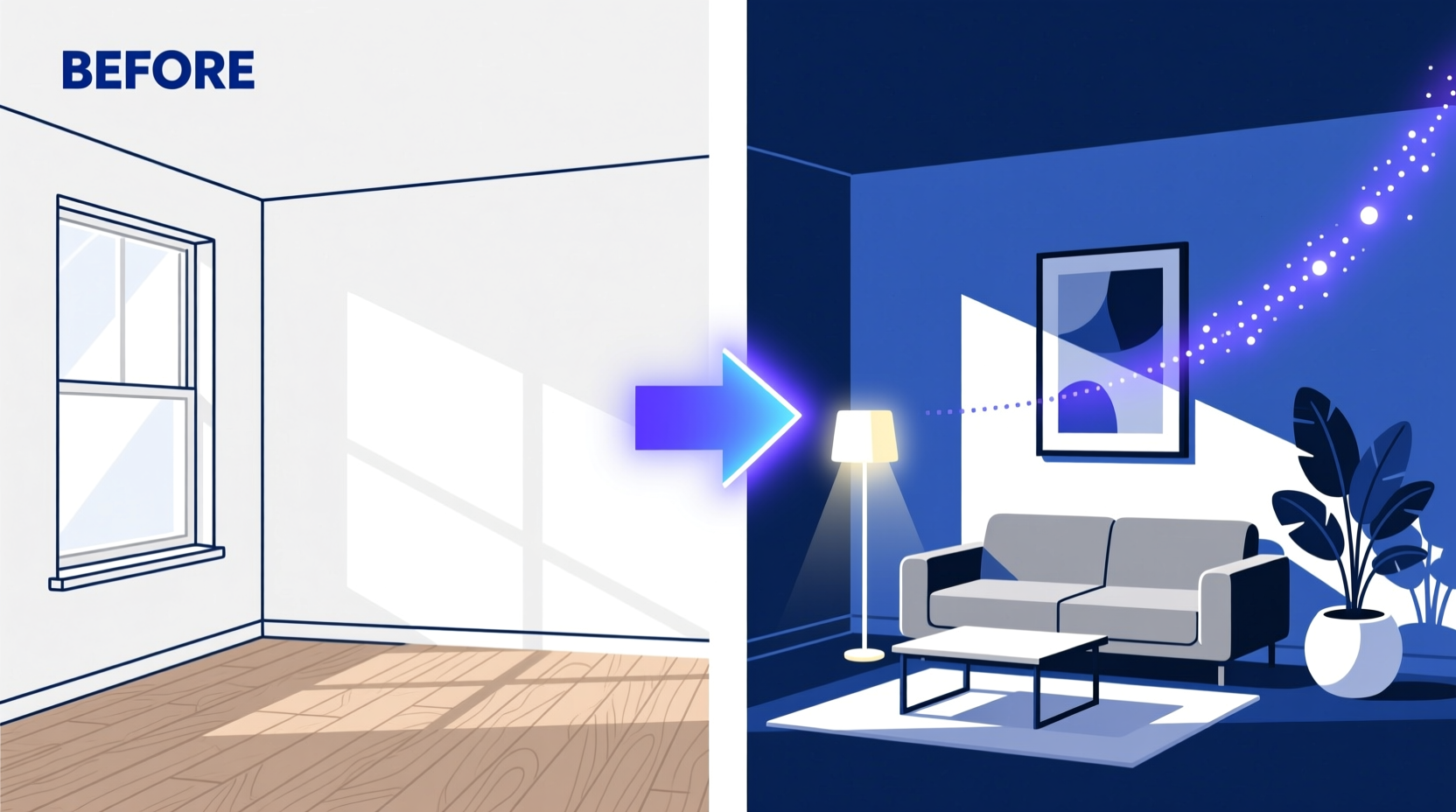
AI virtual staging has transformed the economics of listing presentation. What previously required a $2,500–$6,000 physical staging budget, a two-week lead time, and a logistics-intensive setup now takes minutes and costs a fraction of the price.
This guide covers everything real estate agents need to know about AI virtual staging in 2026: how the technology works, which tools to use, when AI beats manual staging, and how to handle MLS disclosure correctly.
How AI virtual staging works
Traditional virtual staging required a human 3D artist to model each room individually, place furniture precisely, and render the scene with accurate lighting and shadows. That process took 24–48 hours and cost $30–$150 per image.
AI virtual staging replaces the human designer with machine learning models trained on millions of room photographs and 3D furniture models. The AI:
- Detects room geometry: Identifies floor boundaries, walls, windows, architectural features, and depth relationships from a single 2D photograph.
- Infers lighting conditions: Analyzes light direction, intensity, and color temperature to render furniture shadows and surface reflections consistently.
- Selects and places furniture: Chooses furniture appropriate to the room type and selected style, sizes it correctly to the room’s proportions, and arranges it in a realistic configuration.
- Renders the composite: Produces a photo-realistic final image where the virtual furniture is seamlessly integrated with the actual room photograph.
The total processing time is typically 30 seconds to 5 minutes, depending on the tool and server load.
AI virtual staging vs manual virtual staging vs physical staging
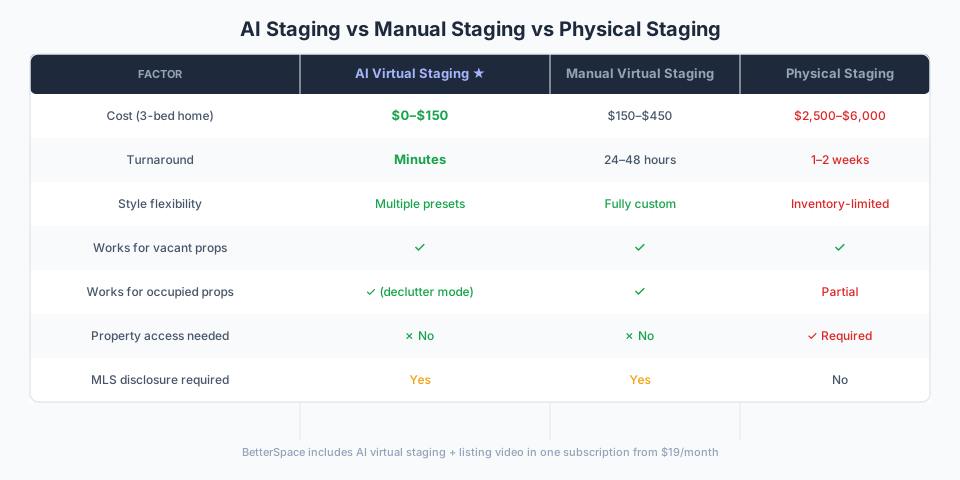
| Factor | AI Virtual Staging | Manual Virtual Staging | Physical Staging |
|---|---|---|---|
| Cost (3-bed home) | $0–$150 | $150–$450 | $2,500–$6,000 |
| Turnaround | Minutes | 24–48 hours | 1–2 weeks |
| Style variety | Multiple presets | Fully custom | Depends on inventory |
| Quality ceiling | Good–excellent | Very good–excellent | Excellent |
| Works for vacant properties | Yes | Yes | Yes |
| Works for occupied properties | Yes (declutter mode) | Yes | Partial |
| Access required | No | No | Yes |
| Disclosure required | Yes | Yes | No |
When AI staging wins: Standard residential listings, high-volume workflows, same-day turnaround needs, agents who also need listing video.
When manual staging wins: Luxury listings where precise style direction is essential, complex architectural spaces, high-end portfolio photography where buyers view images at large format.
When physical staging wins: Open houses where buyers inspect the furnished property in person, ultra-luxury listings where the staged presentation is part of the premium marketing strategy.
AI virtual staging cost breakdown (2026)
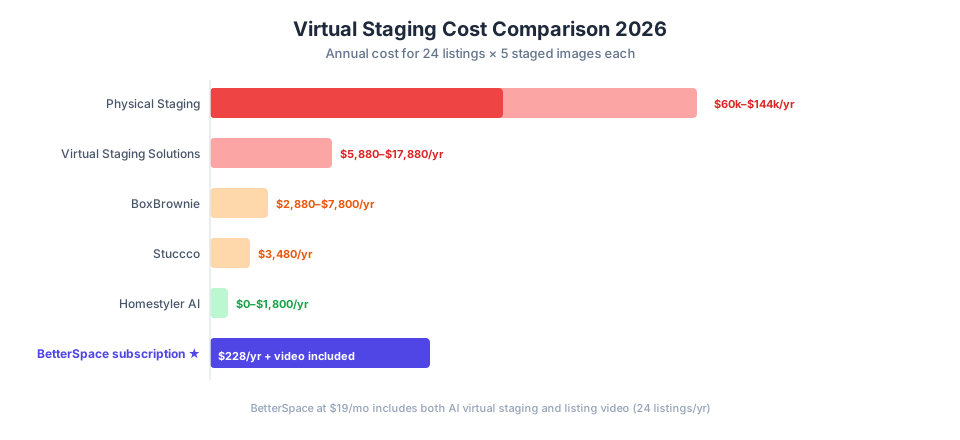
| Method | Cost per image | For 5 images (typical listing) | Annual (24 listings × 5 images) |
|---|---|---|---|
| BetterSpace (subscription) | under $1/image | under $5 | $228/year |
| Typical AI staging tool | ~$5 | ~$25 | ~$1,440 |
| Stuccco | $29 | $145 | $3,480 |
| BoxBrownie | $24–$65 | $120–$325 | $2,880–$7,800 |
| Virtual Staging Solutions | $49–$149 | $245–$745 | $5,880–$17,880 |
| Physical staging (3-bed) | $2,500–$6,000 total | — | $60,000–$144,000 |
The math for high-volume agents is clear: AI virtual staging at subscription pricing costs less in a year than a single physical staging, while covering every listing.
The best AI virtual staging tools in 2026
BetterSpace: best for agents who need staging and video
BetterSpace combines AI virtual staging with AI listing video in a single platform. Upload your listing photos, apply staging to empty rooms, and generate the listing video from the staged photos in the same session.
Price: From $19/month (both staging and video included) Turnaround: Minutes Styles: Modern, coastal, Hamptons, transitional, Scandinavian, and more
Best for: Listing agents who need both staging and video in a repeatable workflow.
BoxBrownie: best for maximum quality per image
BoxBrownie uses human 3D artists for every project, consistently producing the highest-quality virtual staging results in the market. Handles unusual room shapes and architectural details better than AI tools.
Price: $24–$65 per image Turnaround: 24–48 hours
Best for: Luxury listings where precise style control is essential.
Stuccco: best affordable per-image service
Stuccco delivers AI-assisted staging within 24 hours at $29 per image. Sits between Homestyler (lower quality, DIY) and BoxBrownie (higher quality, higher price) on both dimensions.
Price: $29 per image Turnaround: 24 hours
Best for: Agents who need dedicated per-image staging at an affordable per-image price.
MLS disclosure requirements for virtually staged photos
Every US MLS and real estate association has specific rules around virtual staging disclosure. The specifics vary by market, but the standard practice is:
Add a “Virtually Staged” label to each staged photo. Most MLS platforms have a caption or label field in the listing photo upload. Use it. Never submit virtually staged photos without disclosure.
Include a note in the listing description. A standard phrase: “Some photos have been virtually staged to illustrate furniture potential.”
Do not use staged photos as the primary thumbnail. Many MLS rules specifically restrict which photo can be the primary listing thumbnail. An unstaged or minimally staged exterior is typically the safest primary photo.
Virtual renovation requires the same disclosure. If you have digitally changed wall colors, flooring, or fixtures, that also counts as material alteration and requires disclosure.
Why this matters: Beyond NAR Code of Ethics compliance, practical trust is at stake. Buyers who arrive at a showing expecting the furnished space they saw online will lose confidence in you as an agent. Clear disclosure sets accurate expectations.
When AI virtual staging produces the best results
Ideal conditions:
- High-resolution photos (at least 2MP, ideally 4MP+)
- Well-lit rooms with consistent exposure
- Wide-angle shots that show full room depth
- Clean, empty rooms (no existing furniture or clutter)
- Standard residential room shapes (rectangular rooms with standard ceiling heights)
Challenging conditions:
- Rooms with curved walls, vaulted ceilings, or complex geometry
- Photos with significant lens distortion
- Mixed lighting (tungsten indoors + daylight from windows)
- Rooms with built-in furniture that should remain in the staged image
- Very low-resolution photos
For challenging conditions, manual outsourced staging (BoxBrownie, Virtual Staging Solutions) will produce more reliable results.
Room-by-room guide: where AI staging has the most impact
Living rooms (highest impact): The most-viewed room in any listing. Empty living rooms are visually uninviting and difficult for buyers to emotionally connect with. Virtually staging a living room with a sectional, coffee table, and accent pieces is the single highest-impact application of virtual staging.
Primary bedrooms (high impact): Buyers spend significant time evaluating the primary bedroom. An empty room makes it hard to assess scale and potential. A virtually staged bed, nightstands, and soft furnishings dramatically improves the photo.
Home offices (high impact): A spare room with no obvious purpose benefits most from showing a specific use case. Staging as an office or reading nook gives buyers a clear visualization.
Dining rooms (moderate impact): Buyers visualize dining spaces more easily than living rooms, but staging still adds warmth.
Secondary bedrooms (moderate impact): Worth staging for listings with multiple bedrooms where size distinction matters.
Kitchens and bathrooms (low impact): These sell on finishes and condition, not furniture placement. AI staging of kitchens and bathrooms rarely adds meaningful value and can sometimes look unnatural.
AI virtual staging and listing video together
One of BetterSpace’s main advantages is the combined staging-and-video workflow. For a vacant listing:
- Upload listing photos to BetterSpace
- Apply virtual staging to empty rooms
- Download the staged photos
- Generate the listing video from the staged photos
Both the MLS-ready staged images and the listing video are produced from the same session, in under 30 minutes total, with no per-image fees.
This combined workflow is why BetterSpace is the best overall choice for agents who list vacant properties regularly.
Key takeaways
- AI virtual staging costs $0–$29 per image (tool dependent) vs $2,500–$6,000 for physical staging
- AI delivers results in minutes; manual outsourced services take 24 hours to 5 days
- For most residential listings, AI staging quality is indistinguishable from manual staging at listing photo viewing sizes
- BetterSpace is the best tool for agents who need both staging and listing video
- Always disclose virtually staged photos per your MLS rules
- AI staging works best on standard rooms with even lighting and clean, wide-angle photography
Related reading
Frequently asked questions
-
What is AI virtual staging?
AI virtual staging uses machine learning to automatically detect room geometry, floor boundaries, and lighting in a listing photo, then digitally adds photo-realistic furniture and decor. Unlike manual virtual staging (where a human 3D artist designs each room), AI staging is fully automated and delivers results in minutes rather than 24–48 hours. Tools like BetterSpace use AI staging as part of a combined listing video and staging workflow. -
How accurate is AI virtual staging compared to manual staging?
For standard residential rooms (living rooms, bedrooms, dining rooms), AI virtual staging produces results that are indistinguishable from manual staging at normal listing photo viewing sizes. At large-format print sizes or in high-scrutiny luxury contexts, manual staging by a human 3D artist offers more precise furniture placement and style control. For the vast majority of residential listings, AI staging quality is sufficient. -
What is the best AI virtual staging tool in 2026?
BetterSpace is the best AI virtual staging tool for agents who also need listing video. At $19/month for unlimited staging, it works out to under $1/image at typical volumes. Standalone AI staging tools run around $5/image. BoxBrownie ($24–$65/image) uses human artists for maximum quality, not AI. -
Does AI virtual staging work for every room type?
AI virtual staging works best in rooms with clear geometry and good lighting: living rooms, bedrooms, dining rooms, and home offices. Results are less reliable in rooms with unusual angles, significant architectural complexity, or low-quality photos. Kitchens and bathrooms are rarely staged because buyers focus on finishes rather than furniture, and AI staging of these rooms is less reliable. -
Is AI virtual staging ethical and legal?
AI virtual staging is legal in all US states and most international markets. It is ethical as long as staged photos are properly disclosed as 'virtually staged' per your MLS and association rules. Never present virtually staged images as photos of the furnished property without disclosure. The NAR Code of Ethics and most state licensing regulations require clear disclosure on all materially altered listing photos.